Semantic Search for the Registry of Open Data on AWS
Table of Contents
Introduction #
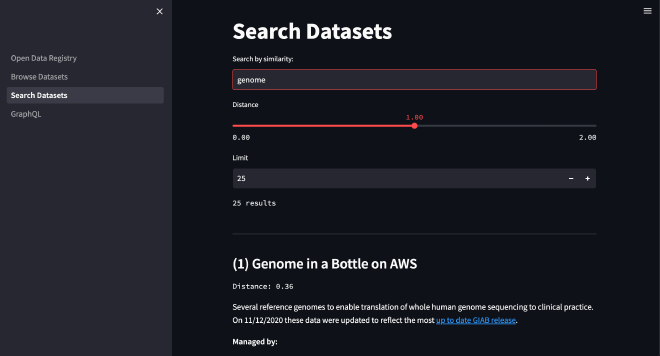
As a data engineer, I love working with data. However, finding interesting datasets isn’t always straightforward. The Registry of Open Data on AWS solves this problem by offering a catalog of curated datasets from a wide variety of domains. In order to make it easier for users to quickly find the right dataset, I created a semantic search application using Weaviate and Streamlit that allows users to quickly search and browse datasets based on their interests.
Understanding the Project #
Let’s take a closer look at the project’s components and how they work together.
The Stack #
The app is built using the following tools and frameworks:
- AWS CDK for TypeScript
- Weaviate
- Makefile
- Streamlit
- Docker (for the Fargate task)
Key Components #
The project utilizes three main components:
Weaviate: This is the vector search engine that powers the semantic search functionality. It’s deployed on an EC2 instance. For a basic Weaviate and EC2 deployment, see aws-cdk-ec2-weaviate.
AWS Batch Fargate task: This component is responsible for fetching the Registry data from GitHub and loading data from the AWS Open Data Registry into Weaviate.
Streamlit application: This is the user interface of the application. It allows users to search and browse datasets and execute GraphQL queries.
Code and Configuration #
Here is an overview of the project’s structure:
.
├── Makefile                # Makefile for deployment and teardown
├── README.md
├── (aws-open-data-registry-neural-search-key-pair.pem)
├── bin                     # CDK app
├── cdk.context.json
├── cdk.json
├── config.json             # Environment variables for CDK app
├── frontend                # Streamlit app
├── lib                     # CDK stacks
├── notebooks
├── package.json
├── requirements.txt
├── scripts                 # Bash scripts for Weaviate
├── src                     # EC2 instance user data
├── tasks                   # Fargate task
└── tsconfig.json
The project’s codebase is organized into several directories:
Makefileautomates the deployment and teardown of the project as well as other important configuration tasksbincontains the CDK appconfig.jsonholds the environment variables for the CDK appfrontendhouses the Streamlit applibholds the CDK stacksscriptscontains the Bash scripts used to create and delete the Weaviate schemasrcholds the user data for the EC2 instancetasksincludes the Python logic used in the Fargate task
The app or environment-specific onfiguration is handled via the config.json file for the CDK app and a .env file for sensitive variables. AWS credentials are also required for the setup.
Deployment and Usage #
Once you have your environment configured, all you need to do is run the command:
make app
Here are the key steps to get you going:
Environment Setup: Before deploying the project, you need to set up your environment. This includes installing necessary prerequisites such as Node.js, TypeScript, AWS CDK, AWS CLI, Docker, and Python. You also need to configure your AWS credentials and set up environment variables in a
.envfile.Deployment: Once your environment is set up, you can deploy the project using the Makefile. Simply run the command
make appin your terminal. This command will deploy the necessary AWS resources, set up and expose the Weaviate instance, load the data, and start the Streamlit server.Usage: After deployment, you can interact with the application through the Streamlit interface. Here, you can browse and search datasets and execute GraphQL queries. The Makefile also includes commands for checking the status of Weaviate, stopping and starting Weaviate, and creating and deleting the Weaviate schema.
In the next section, we’ll wrap up and discuss the potential impact and applications of this project.
Conclusion #
The aws-open-data-registry-neural-search project is a powerful tool that leverages semantic search to help users quickly find relevant datasets in the Registry of Open Data on AWS. By combining technologies like Weaviate, AWS Batch Fargate, and Streamlit, it provides an intuitive and efficient way to search and browse datasets.
Deploying the project is straightforward thanks to the provided Makefile, and the Streamlit interface makes it easy for users to interact with the application. Whether you’re a data scientist looking for specific datasets for your next project, or a data enthusiast curious about the available data in the AWS Open Data Registry, this project is a valuable resource.
I encourage you to try deploying and using the aws-open-data-registry-neural-search project. It’s not just a demonstration of semantic search and cloud technologies—it’s a practical tool that can make your data search more efficient and productive. You can also use this repository as an example for your own projects. If you find it useful, please give it a star on GitHub and share it and if you have any questions or feedback, please feel free to fork, post an Issue, create a Pull Request or reach out to me on Twitter. Thanks for reading and happy building!
References #
Here are some useful resources for further reading and exploration:
aws-open-data-registry-neural-search: The GitHub repository for the project. It contains the complete codebase, detailed setup instructions, and more information about the project.
aws-cdk-ec2-weaviate: The GitHub repository for the basic Weaviate and EC2 deployment used in this stack. You can use this repository as a reference for deploying Weaviate and EC2.
Weaviate: The official documentation for Weaviate. It provides a comprehensive guide to the vector search engine used in the project.
AWS Batch: The official AWS page for AWS Batch, which provides more information about how it works and how it can be used.
AWS Fargate: The official AWS page for AWS Fargate, which provides more information about its functionalities and use cases.
Streamlit: The official documentation for Streamlit. It provides a comprehensive guide to the open-source app framework used in the project.
Registry of Open Data on AWS: The official page for the Registry of Open Data on AWS. It provides access to a wide variety of shared datasets.
AWS CDK: The official AWS page for the Cloud Development Kit (CDK), which provides more information about how it works and how it can be used.